Generating Prisma Client
Prisma Client is an auto-generated database client that's tailored to your database schema. By default, Prisma Client is generated into the node_modules/.prisma/client folder, but you can specify a custom location.
To generate and instantiate Prisma Client:
-
Ensure that you have Prisma CLI installed on your machine.
-
Add the following
generatordefinition to your Prisma schema:generator client {
provider = "prisma-client-js"
} -
Install the
@prisma/clientnpm package:npm install @prisma/clientwarningWe recommend that you keep both the
prismaand@prisma/clientpackages in sync to avoid any unexpected errors or behaviors. -
Generate Prisma Client with the following command:
prisma generate -
You can now instantiate Prisma Client in your code:
- TypeScript
- JavaScript
import { PrismaClient } from '@prisma/client'
const prisma = new PrismaClient()
// use `prisma` in your application to read and write data in your DB
const { PrismaClient } = require('@prisma/client')
const prisma = new PrismaClient()
// use `prisma` in your application to read and write data in your DB
Important: You need to re-run the
prisma generatecommand after every change that's made to your Prisma schema to update the generated Prisma Client code.
Here is a graphical illustration of the typical workflow for generation of Prisma Client:
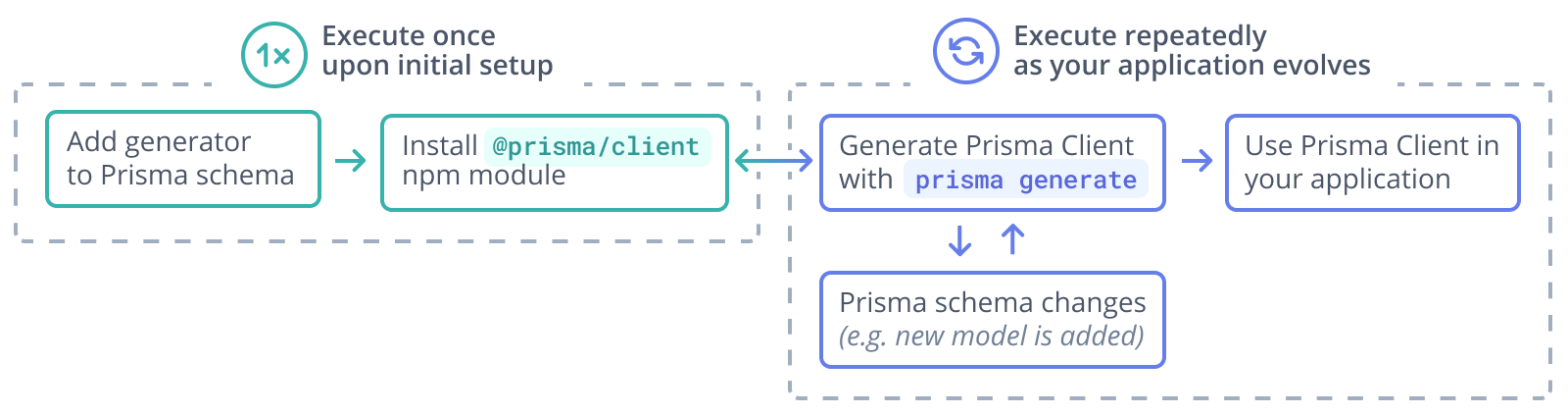
Note also that prisma generate is automatically invoked when you're installing the @prisma/client npm package. So, when you're initially setting up Prisma Client, you can typically save the third step from the list above.
The @prisma/client npm package
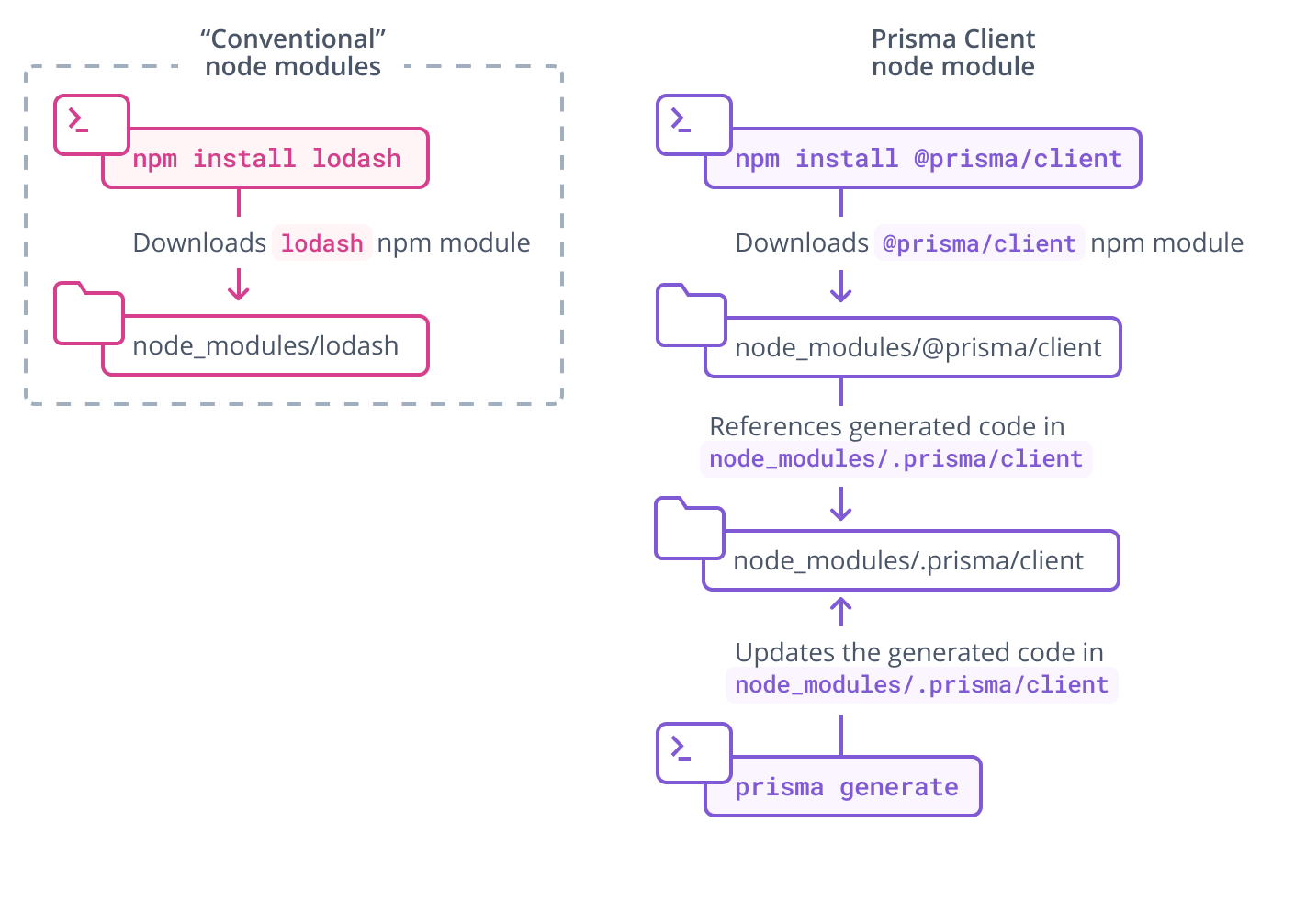
The @prisma/client npm package consists of two key parts:
- The
@prisma/clientmodule itself, which only changes when you re-install the package - The
.prisma/clientfolder, which is the default location for the unique Prisma Client generated from your schema
@prisma/client/index.d.ts exports .prisma/client:
export * from '.prisma/client'
This means that you still import @prisma/client in your own .ts files:
import { PrismaClient } from '@prisma/client'
Prisma Client is generated from your Prisma schema and is unique to your project. Each time you change the schema (for example, by performing a schema migration) and run prisma generate, Prisma Client's code changes:
The .prisma folder is unaffected by pruning in Node.js package managers.
The location of Prisma Client
If you do not specify a custom output in the generator block, Prisma Client is generated into the ./node_modules/.prisma/client folder by default. There are some advantages to maintaining the default location.
Using a custom output path
You can also specify a custom output path on the generator configuration, for example (assuming your schema.prisma file is located at the default prisma subfolder):
generator client {
  provider = "prisma-client-js"
  output   = "../src/generated/client"
}
After running prisma generate for that schema file, the Prisma Client package will be located in:
./src/generated/client
To import the PrismaClient from a custom location (for example, from a file named ./src/script.ts):
import { PrismaClient } from './generated/client'
Why is Prisma Client generated into node_modules/.prisma/client by default?
Importing Prisma Client
By generating Prisma Client into node_modules/.prisma/client and exporting it from @prisma/client, you can import it and instantiate Prisma Client in your code as follows:
import { PrismaClient } from '@prisma/client'

const prisma = new PrismaClient()

// use `prisma` in your application to read and write data in your DB
or
const { PrismaClient } = require('@prisma/client')

const prisma = new PrismaClient()

// use `prisma` in your application to read and write data in your DB
Keeping the query engine out of version control by default
Prisma Client uses a query engine to run queries against the database. This query engine is downloaded when prisma generate is invoked and stored in the output path together with the generated Client.
By generating Prisma Client into node_modules, the query engine is usually kept out of version control by default since node_modules is typically ignored for version control.
When using a custom output path for the generated Prisma Client, it is advised to exclude it from your version control. For Git, this means adding the output path to your .gitignore file.
Generating Prisma Client in the postinstall hook of @prisma/client
The @prisma/client package defines its own postinstall hook that's being executed whenever the package is being installed. This hook invokes the prisma generate command which in turn generates the Prisma Client code into the default location node_modules/.prisma/client. Notice that this requires the prisma CLI to be available, either as local dependency or as a global installation. It is recommended to always install the prisma package as a development dependency, using npm install prisma --save-dev, to avoid versioning conflicts.